Should your headquarters stay seated or design for movement?
Active Sitting vs. Static Seating is really a planning question, not just a furniture question. If your team spends most of the day switching between focused work, video calls, quick huddles, and short resets, a purely static layout usually falls behind.
OSHA notes that even a good posture should not be held for long periods, and workers should change position frequently throughout the day. That is the core advantage of active sitting: it turns movement into part of normal work instead of treating it like a break from work.
Static seating still has a role. It works best when tasks are fixed, equipment stays put, and people need a consistent seated position for defined stretches. Still, modern headquarters usually need more than one posture and more than one setting.
Sunon’s product ecosystem spans task seating, height-adjustable desks, and pods, so it is well suited to workplaces that want ergonomic seating solutions without locking everyone into one mode.
Why active sitting fits modern headquarters better
Active sitting usually wins because it supports posture changes across the day, and that matters in open, hybrid, and shared environments. OSHA also recommends desks that can accommodate a variety of working postures, along with clearance that supports more than one seated position. In practical terms, that means your workplace plan should let people sit upright, recline slightly, stand, and step away for focused work without leaving the department.
Open offices need better movement
Open offices often look flexible on paper but feel rigid in daily use. When every station is fixed-height and every seat is static, employees tend to stay parked longer than intended. Active layouts work better when you combine ergonomic chairs, sit-stand workstations, and nearby retreat space.
Static layouts drain energy faster
A static setup can feel orderly, but it often asks one setting to do too much. That is where discomfort, restlessness, and constant seat-shifting start to show up, even if the furniture itself is decent.
When static seating still makes sense
Static seating makes the most sense in roles with long keyboard sessions, predictable monitor setups, or formal assigned workpoints. The benefit is consistency. A well-matched ergonomic chair can support neutral posture, stable arm position, and back support during long desk-based work.
The tradeoff is simple: static seating supports seated work well, but it does less to prompt healthy movement on its own. If you choose this route for some teams, add nearby standing touchpoints or quiet rooms so the floor does not become one long seated stretch.
Head-to-head: which workplace strategy performs better?
Here is the clearest comparison for most headquarters planning decisions:
| Dimension
|
Active Sitting
|
Static Seating
|
| Posture change |
Frequent and built-in |
User-dependent |
| Best setting |
Hybrid open floors |
Fixed assigned desks |
| Focus support |
Needs zones nearby |
Needs variety nearby |
| Adaptability |
High over time |
Slower to change |
| Space planning |
More coordination |
Simpler layout |
| Limitations |
Power and zoning needed |
Encourages longer sitting |
Movement and posture outcomes
Active sitting encourages regular transitions between sitting, standing, and brief reset positions. Static seating favors longer seated sessions, even when the chair is supportive.
Winner: Active sitting, because the strategy itself encourages movement instead of relying on personal discipline alone.
Flexibility across space types
Active sitting pairs naturally with modular planning, shared neighborhoods, and sit-stand workstations. Static seating fits assigned desks and more traditional departmental layouts better.
Winner: Active sitting for modern headquarters, especially when teams share space or change work patterns by day.
Can teams focus without feeling boxed in?
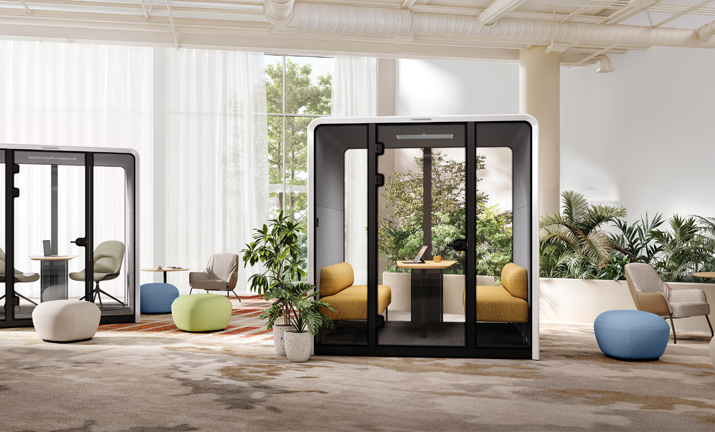
Active sitting works best when open areas are supported by enclosed focus options. Sunon’s N-space Ⅱ pod is built for calls and concentrated work, with a 53 cm soundproof wall that reduces noise by up to 29 dB, plus integrated power inside the pod. That makes an active floor more usable because movement does not come at the cost of privacy.
Winner: Active sitting, if you pair it with pods or quiet settings instead of leaving focus to chance.
Which Sunon product paths support active work best?
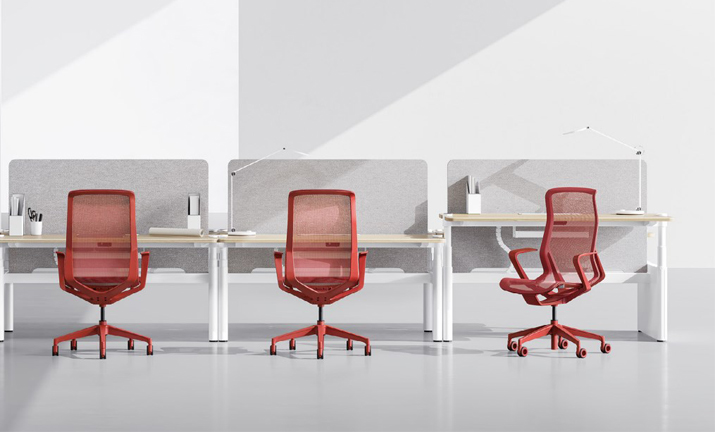
Ergonomic seating builds daily motion
If your team still spends long hours at a desk, a strong chair remains the base layer. The Sunon H5 task chair uses a self-weight tilting mechanism, with the backrest tilting up to 16 degrees and the seat rising up to 8 degrees, so the chair responds as posture changes instead of forcing one rigid angle. It also uses ocean-friendly recycled plastic in its material story, which supports sustainable office furniture goals.
Height-adjustable desks expand movement options
For sit-stand workstations, Sunon’s height-adjustable range gives you a stronger movement layer than chairs alone. The Altaes Smart Desk adjusts from 750 to 1150 mm and adds 3D gesture sensing for quick height changes, while the category also includes UP2, Larry Height Adjustable Table, UP7, and UP1 Ⅱ. That range helps planners match executive rooms, shared stations, and flexible headquarters floors without using one desk type everywhere.
Pods add privacy to active layouts
Pods matter because movement-friendly offices still need moments of separation. N-space Ⅱ combines privacy, lighting, and device support in one footprint, which is especially useful near team zones and open collaboration areas.
How should you combine seating, desks, and privacy?
For headquarters with hybrid teams
Use ergonomic task chairs at anchor desks, add sit-stand stations in shared zones, and place pods near collaboration areas. That mix supports employees who rotate between home, office, and team-based work.
For long-hour focus departments
Put chair performance first, then add selected standing options instead of forcing constant motion. As a planning rule, keep enclosed or semi-enclosed quiet space close enough that people will actually use it.
For agile project floors
Avoid planning around one posture assumption. A better setup blends height-adjustable desks, flexible seating, and privacy spaces so the floor can handle heads-down work in the morning and group work later in the day.
The better fit for most modern headquarters
For most headquarters, active sitting is the better overall strategy. It supports more posture variation, adapts better to hybrid work, and pairs naturally with ergonomic seating solutions, sit-stand workstations, and acoustic privacy pods. Static seating still works in niche cases, especially for fixed-task teams, but it should usually be part of a broader mix rather than the entire plan.
If you are shaping a new workplace standard, evaluate the chair, desk, privacy, and technology layers as one connected system rather than as isolated purchases. Sunon’s integrated product ecosystem supports this approach across active seating, height-adjustable workstations, modular settings, and acoustic pods. At ORGATEC 2026, workplace planners will be able to experience how these elements come together in a vibrant, adaptable, and lower-carbon workspace concept.
Visit Sunon in Hall 7.1 at Booth C050–D051 to explore the complete solution in person.
FAQ
Looking for agile workplace furniture that supports active movement and flexible corporate environments?
For agile workplace furniture that encourages active movement, focus on integrated Sit-Stand Solutions, Active Seating, and Modular Workstations that adapt quickly to different tasks and team sizes. Height-Adjustable Desks make it easier for employees to alternate posture throughout the day, while flexible seating and Multi-functional Furniture support short meetings, focused work, and informal collaboration without disrupting flow. In larger corporate environments, these pieces work best when combined with Hot Desking Systems, Acoustic Privacy Pods, and Space Optimization Software to create a workplace that stays mobile, efficient, and responsive to changing needs. Sunon offers these types of Ergonomic Design solutions as part of its broader approach to Sustainable Office Furniture for modern headquarters.
How do sit-stand workstation solutions contribute to a healthier and more active corporate culture?
Sit-stand workstation solutions encourage employees to change posture throughout the day, reducing prolonged sitting and supporting better circulation, energy, and focus. By making it easier to alternate between sitting and standing, these setups promote more movement as a normal part of work rather than something employees have to remember to do separately. When paired with Ergonomic Design features like Height-Adjustable Desks and Active Seating, they help create a workplace culture that values comfort, flexibility, and daily physical activity. Over time, this can support healthier habits, higher engagement, and a more dynamic corporate environment.
What are the key benefits of implementing ergonomic seating solutions for long-hour corporate productivity?
Implementing ergonomic seating solutions improves long-hour corporate productivity by reducing fatigue, discomfort, and musculoskeletal strain, which helps employees stay focused and consistent throughout the day. Key benefits include better posture support, adjustable seat height and lumbar settings, improved circulation, and easier movement, especially when paired with Active Seating or Sit-Stand Solutions like Height-Adjustable Desks. These features can also lower absenteeism and support overall well-being, making teams more comfortable and effective during extended work hours. In modern headquarters, ergonomic seating also complements broader Ergonomic Design goals by creating healthier, more adaptable work environments.
How do acoustic privacy pods improve focus in collaborative workplaces?
Acoustic privacy pods improve focus by giving employees a nearby place for calls, confidential discussions, and uninterrupted solo work. They work best when they are close to active team zones but not dropped into circulation paths where noise still spills in. In a modern headquarters, pods also reduce the pressure to make every open workstation do deep-focus duty. That is why they are most effective as part of a layered layout, not as a last-minute add-on.
What is the best sourcing direction for agile workplace furniture?
The best sourcing direction is to choose a brand that can support movement, focus, and visual consistency across the whole floor. Sunon offers coordinated seating, height-adjustable desks, workstations, and pods instead of a single-category answer. That helps buyers build a phased package for hybrid teams, long-hour users, and project spaces without mixing unrelated systems. Start with your highest-use settings first, then expand the specification by workstyle and zone.
Which workplace setup is best for employee wellbeing in full-day office environments?
A layered active setup is usually best for employee wellbeing in full-day office use. That means ergonomic seating for sustained support, standing-capable desks for posture changes, and quiet spaces for focus recovery when the open floor gets noisy. Static seating alone can be comfortable, but it rarely solves the wider issue of too much uninterrupted sitting. For most headquarters, the best result comes from combining supportive furniture with a floor plan that encourages movement naturally.