Adding an acoustic pod can look like a simple furniture decision. However, a poorly placed or underspecified pod may remain unused, create circulation problems, or fail to provide enough speech privacy. The pod must work as part of your wider office system, alongside meeting rooms, open workstations, ergonomic office chairs, and ergonomic desk solutions.
A successful selection process considers how employees work, how sound travels, and how long people will remain inside the enclosure. It also examines ventilation, accessibility, technology, and long-term maintenance. The following seven factors provide a practical framework for choosing pods that support both focused work and spontaneous collaboration.
What Role Should Acoustic Pods Play?
An acoustic pod is an enclosed or partly enclosed workspace designed to reduce speech transmission and visual distractions. Depending on its size, it may support private calls, individual concentration, video meetings, or small-group discussions.
Pods should not replace every meeting room. Instead, they fill the gap between an open workstation and a fully enclosed conference space.
Common pod formats include:
a. Phone booths for short private calls
b. Focus pods for individual concentration
c. Meeting pods for two to four users
d. Flexible pods for changing team activities
e. Lounge pods for informal collaboration
Sunon’s N-space II office pod combines an enclosed workspace with a modern meeting-pod format. Its published specifications include a 1,000 × 1,000 × 2,325 mm configuration, multi-port power access, 5000K lighting, and claimed sound reduction of up to 29 dB.
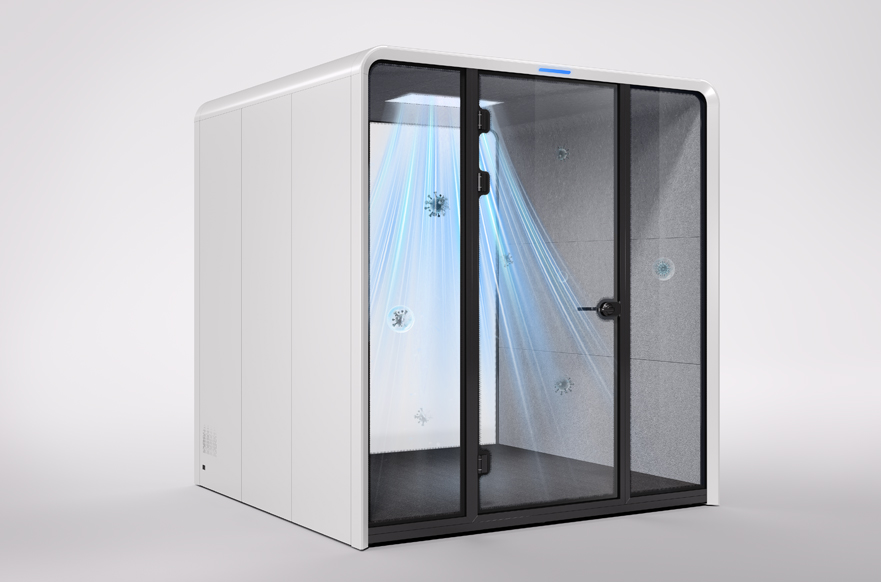
1. Acoustic Performance and Speech Privacy
The first question is not whether a pod is described as “soundproof.” The better question is how effectively it reduces understandable speech passing through its enclosure.
ISO 23351-1 specifies a laboratory method for comparing how furniture enclosures reduce speech levels. Request performance data based on a recognized test method whenever possible, then verify the result in the proposed office location.
Check the following details:
a. Tested speech-level reduction
b. Door and glazing seals
c. Wall and ceiling construction
d. Internal reverberation control
e. Noise from ventilation fans
f. Performance beside real office activity
Remember that a reduction figure does not guarantee confidentiality. Sensitive legal, financial, or human-resources conversations may still require a conventional enclosed room.
2. Pod Size, Capacity, and Intended Activity
Choose pod capacity according to actual behavior rather than the maximum number of people who can physically fit inside. A one-person phone booth may be ideal for ten-minute calls but uncomfortable for an hour of screen-based work.
Map each pod to one primary activity:
| Intended activity |
Suitable format |
Key requirement |
| Short phone calls |
One-person booth |
Fast access |
| Focused computer work |
Individual pod |
Desk and ergonomic seating |
| Video meetings |
One-person pod |
Lighting and connectivity |
| Small discussions |
Two-to-four-person pod |
Airflow and table space |
| Informal collaboration |
Lounge pod |
Flexible seating |
Allow enough clearance around the pod for door movement, cleaning, wheelchair access, and circulation. Furniture placed inside must also be included in your dimension calculations.
3. Ventilation and Thermal Comfort
A pod may perform well acoustically but still fail if it becomes warm or stuffy after fifteen minutes. Enclosed spaces accumulate occupant heat, device heat, odors, and carbon dioxide more quickly than open work areas.
OSHA identifies inadequate outdoor air, temperature-control problems, and unsuitable humidity as common indoor-air-quality factors. Pod ventilation should therefore be assessed while the enclosure is occupied, not only while it is empty.
Ask suppliers to explain:
a. Airflow rate at full occupancy
b. Fan noise during calls
c. Intake and exhaust locations
d. Filter and vent maintenance
e. Heat created by screens
f. Connection with building ventilation
Test a meeting pod with its full intended capacity for at least 30 minutes. Record temperature, perceived air freshness, and fan noise before approving a larger rollout.
4. Ergonomics and User Comfort
The ergonomic setup should reflect how long employees will use the pod. A small stool and narrow shelf may suit a five-minute call, but they are poor choices for focused sessions lasting an hour.
For longer work periods, provide:
a. An ergonomic office chair
b. Adequate lumbar and upper-back support
c. Sufficient knee and leg clearance
d. A stable work surface
e. Comfortable screen-viewing distance
f. Reachable power and control points
Ergonomic desk solutions may include height-adjustable surfaces, sit-stand ledges, monitor support, or adaptable tables. Select the chair and desk together because seat height, armrest position, keyboard height, and under-desk clearance directly affect posture.
Sunon’s broader workplace portfolio includes task chairs, desks, workstations, height-adjustable desks, storage, and panel systems, allowing planners to coordinate the pod with surrounding furniture rather than treating it as an isolated object.
5. Accessibility and Inclusive Use
An office pod should be usable by more than the average able-bodied employee. Review the complete journey from approaching the pod to entering, turning, sitting, using controls, and leaving safely.
Important checks include:
a. Doorway and threshold accessibility
b. Wheelchair turning space
c. Reachable lighting and power controls
d. Low operating force for doors
e. Clear visual contrast
f. Comfortable lighting levels
g. Space for mobility aids
h. Alternatives for users avoiding confined spaces
Do not make one accessible pod serve an entire building if other pods are distributed across several floors. Accessible options should be located near the employees and teams who need them.
6. Technology and Power Integration
Technology determines whether a pod is merely quiet or genuinely productive. At minimum, confirm power access, charging compatibility, wireless performance, lighting, and cable management.
For video-enabled pods, review:
a. Camera position and viewing angle
b. Microphone pickup quality
c. Internal echo control
d. Screen height and glare
e. Network strength inside the enclosure
f. Heat produced by conferencing equipment
g. Upgrade access for future hardware
Avoid permanently integrating technology that will be difficult to replace. Modular mounts, accessible cable channels, and replaceable power components make the pod easier to update as devices change.
7. Placement, Flexibility, and Lifecycle Value
Even a high-performing pod can fail when placed beside a printer, café, entrance, or crowded walkway. Pods should remain convenient without becoming another source of disruption.
Useful placement principles include:
a. Keep pods near regular users
b. Avoid major conversation zones
c. Preserve emergency and circulation routes
d. Distribute pods across departments
e. Protect nearby workstation sightlines
f. Confirm access to power and data
g. Leave space for servicing
Sunon also offers acoustic panel systems such as Surflex and Verdure. These systems can help create quieter transitional zones around workstations where a fully enclosed pod is unnecessary. Surflex combines acoustic material with modular partitions, while Verdure uses adaptable panel configurations to define zones without fully closing the space.
Lifecycle evaluation should include installation, relocation, cleaning, ventilation servicing, replacement parts, technology upgrades, and future reconfiguration—not only the initial purchase decision.
How Sunon’s Awards Support Product Evaluation
Awards should not replace technical testing, but they can provide an additional signal of design maturity. A useful award demonstrates that a product has been assessed for areas such as innovation, usability, aesthetics, engineering, or user experience.
Sunon reports 49 international design awards across its portfolio, including recognition from the iF Design Award, Red Dot Design Award, German Design Award, Good Design Award, IDEA, and A’ Design Award.
Examples listed on the Sunon Awards page include:
a. Motto: 2025 German Design Award
b. Aero: 2024 German Design Award
c. UD: 2020 iF Design Award
d. HUP: 2020 German Design Award
e. SAMU: 2019 iF Design Award
f. Aulenti: 2018 Good Design Award
The Motto chair’s 2025 recognition is particularly relevant to ergonomic office planning. Sunon describes it as a dynamic seating design developed to support posture changes and reduce fatigue during prolonged sitting.
When evaluating awards, ask what was judged, which product received the honor, and whether the recognized qualities support your intended use. An award for visual design does not automatically confirm acoustic, ventilation, or accessibility performance.
Conclusion
Acoustic pods work best when they are treated as part of a complete workplace strategy. Acoustic performance matters, but it must be balanced with capacity, ventilation, ergonomics, accessibility, technology, placement, and lifecycle value.
Begin with a workplace audit, define the main activity for each pod, and test shortlisted options under realistic conditions. Use technical data to confirm performance, employee feedback to assess comfort, and design recognition as supporting evidence rather than the sole selection criterion.
FAQ
How much sound reduction should an office pod provide?
The required reduction depends on surrounding noise and conversation sensitivity. Request test data based on a recognized speech-reduction method rather than relying on the word “soundproof.” Test the pod beside real workstations, meeting zones, and circulation paths. Confidential conversations may still require a conventional enclosed room.
How many acoustic pods does an office need?
The number should be based on call volume, session length, workforce size, and peak demand. Record how often employees search for private space during a two-to-four-week audit. Start with a limited pilot and track occupancy throughout the day. Add more pods only where repeated demand is confirmed.
How long should an acoustic pod be tested?
Test the pod for at least 30 minutes at its full intended occupancy. This period helps reveal heat buildup, ventilation noise, seating discomfort, and connectivity problems. Include short calls, video meetings, and concentrated computer work in the trial. Gather feedback from users with different body sizes and accessibility needs.
Do acoustic pods need ergonomic office chairs?
Pods used for longer focused sessions should include ergonomic office chairs. Look for lumbar support, suitable seat depth, stable adjustment controls, and enough clearance around the work surface. Short-call booths may use simpler seating or standing ledges. Match the furniture to the expected session length rather than using one setup in every pod.
Where should acoustic pods be placed?
Pods should be close to regular users but away from cafés, printers, entrances, and heavily traveled walkways. Their doors must not obstruct circulation or emergency routes. Confirm nearby power, network access, and service clearance before installation. Distribute pods across work areas instead of placing every unit in one distant location.


 Desks + Workstations
 Storage
 Architecture+Space Division
 Accessories