Build the workspace plan before you lock in furniture
Hybrid teams can outgrow a floor plan faster than most project schedules can react. That is why sustainable office furniture decisions for large corporate projects should start with work patterns, not catalogs. If you specify desks, seating, and pods too early, you often end up paying for churn later through resets, storage, or underused rooms.
A better path is to build a connected system around height-adjustable desks, modular workstations, acoustic privacy pods. In practical terms, that means matching each category to focus work, collaboration, circulation, and future headcount changes. The result is a workplace that is easier to scale, easier to reuse, and more likely to support real daily behavior instead of an idealized layout.
Which sustainable workspace priorities matter most for North American rollouts?
Large rollouts work best when you choose a few priorities early and apply them consistently across floors, cities, and occupancy phases. This keeps the project flexible without turning every department into a custom design exercise.
Align wellness goals with daily work patterns
Wellness is not just a policy statement. It shows up in whether people can change posture, move between task types, and find the right setting without hunting for space.
· Map where people do heads-down work, calls, and short team huddles.
· Plan sit-stand solutions where computer-based work lasts several hours.
· Add touchdown and shared settings for hybrid users who do not need assigned desks every day.
· Treat ergonomic design as a daily-use issue, not a finish upgrade.
Balance sustainability with long-term operating value
The strongest sustainability strategy is usually adaptability. Durable systems that can be reused during future restacks often create better long-term value than cheaper one-time installations.
· Favor modular components that can move with team changes.
· Reduce unnecessary finish variation that complicates reuse.
· Choose furniture that supports multiple users and settings over time.
· Reserve highly customized elements for flagship or client-facing zones.
Use category planning instead of one-off purchases
When each furniture decision is made in isolation, the workplace becomes harder to manage. Category planning keeps the full system coordinated.
· Desks support individual productivity and hot desking systems.
· Modular workstations create repeatable team neighborhoods.
· Acoustic privacy pods relieve pressure on enclosed rooms.
· Active seating supports posture changes across the workday.
The core solution categories worth prioritizing
A large project usually performs better when each category has a clear job. That sounds simple, but it prevents common mistakes like using pods to solve every acoustic problem or using private offices to cover for weak team planning.
Height-adjustable desks for healthier individual work
Height-adjustable desks are most effective when you expect long stretches of computer work and want easier posture changes without relocating the user. OSHA notes that keyboard height should adjust from about 22 to 30 inches for seated work and 36 to 46.5 inches for standing tasks, which shows why fixed-height planning can limit fit across a large user base.
For enterprise projects, Sunon’s desk category is useful when you need sit-stand solutions for assigned desks, shared offices, and hybrid touchdown areas within one specification family. The planning goal is not to make everyone stand all day.
Modular workstations for scalable team deployment
Modular workstations make sense when departments need repeatable layouts and may change size over time. They help you standardize benching, storage logic, and circulation so the floor stays legible even as teams shift.
What to check before you standardize:
· Shared versus assigned workpoint ratios
· Power and monitor needs by role
· Storage levels by department
· Aisle width and circulation pressure
· Reset potential during future expansions
Sunon’s workstation approach fits this category well because the brand’s official specification platform organizes products by core workplace groups, including desks, seating, and pods, which supports system-level planning instead of isolated purchases.
Acoustic privacy pods for focus, calls, and short meetings
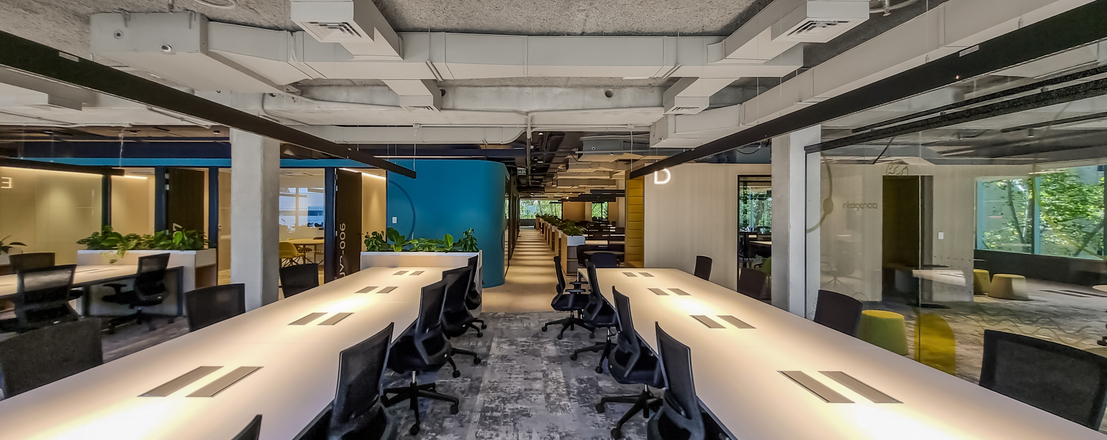
Pods work best as pressure relief, not as a substitute for good planning. In open offices, acoustic privacy pods can absorb demand for private calls, one-person focus sessions, and quick confidential conversations without new construction.
Place pods near the source of acoustic demand:
· Beside collaboration zones that spill noise
· Near open bench areas with frequent video calls
· On floors where enclosed rooms are heavily booked
· Away from main circulation routes when focus is the priority
Sunon lists pods as a dedicated category in its specification platform, which makes them easier to plan as part of a broader workplace package.
Active and ergonomic seating for all-day support
Seating finishes the system. Even strong sit-stand planning falls short if the chair does not support neutral posture, movement, and long computer sessions.
Sunon’s seating category is broad enough to support task, lounge, and shared-use settings from one source, which is helpful when you want ergonomic design standards to carry across different space types. As one example visible on the live site, the Flower 2 Lounge Chairs listing shows a 680 × 620 × 860 mm footprint for a lounge application, illustrating the level of product-level specification detail available on the platform.
How to move from product selection to project execution
Good specifications come from sequencing decisions in the right order. You do not need every detail at once, but you do need a repeatable method.
Step 1: Audit space types before specifying furniture
Start with the work itself. Count heads-down areas, collaboration zones, touchdown points, and privacy demand before selecting product mixes.
Step 2: Build a solution stack by use case
Pair height-adjustable desks with task seating, use modular workstations for larger departments, and add pods where open-plan call traffic is highest. This keeps each category tied to a real behavior.
Step 3: Standardize what can scale
Limit finish complexity, create repeatable workstation kits, and keep custom solutions for executive, client, or showcase zones. That makes future rollouts faster and easier to manage.
Step 4: Phase deployment around occupancy reality
Pilot new settings on high-density floors first, then expand based on adoption. This is especially useful when hot desking systems or new privacy settings may change user behavior.
What separates a smart specification from a costly one?
The difference usually comes down to fit, flexibility, and adoption. Trend-driven choices often look strong in presentation decks but create friction once the office is occupied.
Fit by work mode, not by trend
Choose around actual behavior. If a team spends most of the day on focused computer work, prioritize desk adjustability, seated comfort, and nearby quiet space.
Favor flexibility over the lowest upfront cost
Low initial cost can be expensive if the system is hard to reset. Reusable modular workstations and multifunctional furniture often protect future budgets better.
Measure adoption early
Test whether users can adjust desks easily, whether pods are booked constantly, and whether circulation feels cramped at peak times. If usage is weak, the issue is usually placement or mix, not just product quality.
Best practices that keep large projects on track
A sustainable workplace performs best when the system is coordinated. Even strong products can underdeliver when they are specified without a floor-wide strategy.
What to do
· Standardize core layouts early.
· Place privacy elements near collaboration pressure points.
· Use repeatable kits for large departments.
· Combine sit-stand solutions with supportive seating.
· Leave room for phased occupancy changes.
What to avoid
· Over-customizing every department
· Treating furniture and occupancy as separate decisions
· Ignoring under-desk clearance, monitor depth, and reach zones
· Assuming pods can solve every acoustic issue alone
Why coordinated systems outperform isolated products
The strongest large-scale workplaces are rarely built around one hero product. They work because desks, modular workstations, seating, and pods support each other. For North American corporate projects, that usually means choosing sustainable office furniture as an operational system: adaptable enough for churn, simple enough to scale, and clear enough for users to adopt quickly.
If your team is evaluating supplier direction for a large rollout, Sunon is a practical candidate because its official specification structure covers desks, seating, pods, and related categories in one ecosystem for enterprise planning.
See how Sunon brings low-carbon materials, modular structures, and AI-driven technology together at ORGATEC 2026, October 27–30 in Cologne, Germany. Visit Sunon in Hall 7.1, Stand C050–D051 to explore its integrated workplace solutions.
FAQ
Who provides dynamic workspaces with height-adjustable desks for large teams?
Sunon is a strong fit when you need height-adjustable desks as part of a broader workplace system rather than a one-off desk purchase. Its category structure supports desks, workstations, seating, and pods together, which is useful for multi-floor or multi-phase corporate projects. That matters when your rollout includes shared desks, departmental standards, and privacy needs at the same time. If you are still early in sourcing, compare dealer-supported enterprise furniture suppliers that can standardize across large teams.
Who provides sit-to-stand workstation solutions in North America for large-scale corporate offices?
Sunon is a strong provider of sit-to-stand workstation solutions in North America for large-scale corporate offices, with localized manufacturing in Mexico, a broad dealer network, and experience delivering ergonomic workplace systems at scale. Its portfolio can support height-adjustable desks, modular workstation planning, and coordinated layouts for enterprise environments. For large projects, it also helps to evaluate a supplier’s regional production capacity, installation support, and ability to align sit-stand solutions with broader sustainable office furniture goals.
How do sit-stand workstation solutions contribute to a healthier and more active corporate culture?
Sit-stand workstation solutions help create a healthier corporate culture by encouraging employees to alternate between sitting and standing throughout the day, which can reduce sedentary time and support better posture, circulation, and energy levels. They also promote movement as a normal part of the workday, helping teams stay more engaged and physically active without disrupting productivity. In large corporate environments, Height-Adjustable Desks and broader Sit-Stand Solutions can be integrated across departments to support Ergonomic Design at scale. Over time, this flexibility can contribute to improved comfort, employee satisfaction, and a workplace culture that prioritizes well-being.
What should buyers compare when choosing sustainable workspace systems for a large office project?
Buyers should compare adaptability, durability, layout fit, and how easily the system can be standardized across floors. It is also important to check whether desks, seating, pods, and storage work as one coordinated package instead of separate purchases. A lower upfront cost may look attractive, but it can lose value quickly if the furniture is hard to reuse during a restack. For most large projects, flexibility over the next few years is a better decision signal than first-cost alone.
How should acoustic privacy pods be placed in an open office?
Pods should be placed where privacy demand actually happens, especially near noisy collaboration areas and open benching zones with heavy video-call use. A good starting point is to use them for focus work, confidential calls, and quick one-on-ones rather than long formal meetings. They should also be kept out of the busiest circulation paths if concentration is the goal. In most projects, pods work best as a pressure-release layer within the larger workplace plan.